Create react app is slowing you down.
· 4 min read · Comments ↓
We have still not moved on from create-react-app. Heres a comprehensive essay on why you should not use it.
As developers, we all want to write efficient, maintainable code. We want our applications to be fast, reliable, and easy to understand, with a good developer experience. When we’re restricted by the tools we’re using, it can be frustrating. It can feel like we’re trying to fit a square peg into a round hole.
The problem is, beginners watch tutorials on youtube and use CRA to start with, but they never really upgrade their skills. They just keep using the outdated tools that they initially learnt.
In this post, I’ll discuss why you should probably not use create-react-app anymore, and how you can upgrade from it.
By using another tools, you have much better DX, ship apps faster AND are just happier in life, because of better community support.
But, why should you listen to me?
I ship good, performant products. In fact, I shipped 12+ products last year and made two products already this month. I’m not particularly an expert here - but my choice of tools is optimised for best DX and shipping speed (and quality of product, ofcourse). I started web development about 8 months ago (before which, i worked on discord bots and twitter bots). I’ve used various tools (react or not), including Create React App, and have spoken to and met a lot of experts in this field.
I’ve also had the opportunity to work on a lot of different types of projects, ranging from small personal websites to large-scale enterprise applications.
Argument
It’s officially deprecated
The React team no longer recommends using CRA for new projects. This doesn’t mean that CRA is unsafe or will stop working, but that there’s much better things that you can use instead.
In fact, when you run the command, you’ll be greeted with this error message
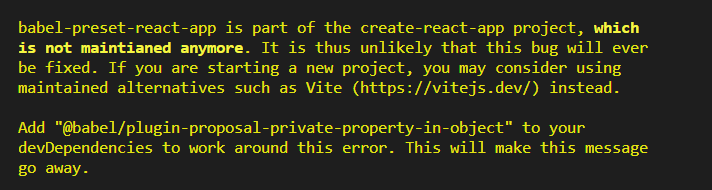
Hmm, not ideal.
Performance issues
Here’s some performance metrics of CRA vs. Vite.
Package Installation Time: Vite takes 22 seconds, while CRA takes 155 seconds.

Dev Server Starting Time: Vite starts in 652 milliseconds, compared to CRA's 7618 milliseconds.

Initial Webpage Loading: Vite loads in 1580 milliseconds, slightly faster than CRA's 1750 milliseconds.

Webpage Reloading: Vite reloads in 380 milliseconds, whereas CRA takes 590 milliseconds.

Hot Module Replacement (HMR): Vite performs HMR in 126 milliseconds, significantly faster than CRA's 643 milliseconds.

Build Time: Vite completes the build in 6.5 seconds, while CRA takes 22.3 seconds
Not only that… The bundle size is much greater in CRA, and hence, the user experience is worse :(
definitely. not. ideal.
Lack of features
Lack of Server-Side Rendering (SSR)
CRA is primarily designed for creating single-page applications (SPAs) with client-side rendering. While it can be configured to use SSR, this is not actively supported by the React development team, and they recommend using a different tool for projects that require SSR
Limited Customization Options
CRA comes with a pre-configured environment, which can make it difficult to add custom build configurations. While it’s possible to “eject” the app to add custom configurations, this can complicate the development process
Poor User experience
The decision to deprecate CRA is also driven by a desire to improve the user experience. By turning CRA into a launcher, the React team hopes to make it easier for developers to choose the right tool for their specific needs
More problems and info discussed here - https://github.com/reactjs/react.dev/pull/5487#issuecomment-1409720741
And that’s still just the tip of the iceberg. There are so many things that are not supported by create-react-app. For example, here’s a snippet from tailwind docs -

Alright, alright, I’m sold… How do I upgrade?
If you are learning,
tbh, Just learn nextjs at https://nextjs.org
If you are migrating,
Migrating to Vite
For migrating to Vite:
- Remove
react-scriptsfrom your project. - Install Vite and any necessary plugins.
- Move your
index.htmlto the root of your project (if coming from CRA). - Create a
vite.config.jsfile to configure Vite for your project
Migrating to Next.js
If you’re looking to move from CRA to Next.js:
- Create a new Next.js project or update your
package.jsonto removereact-scriptsand addnext,react, andreact-dom - Update your project structure to follow Next.js conventions, such as adding a
pagesdirectory for your routes. - Update your build and start scripts in
package.jsonto use Next.js commands (next dev,next build,next start)
Conclusion
In the world of web development, Create React App (CRA) has become a popular tool for setting up a new React.js project. It offers a comfortable environment for developers, providing a pre-configured setup that allows you to start coding right away. However, while it’s a great tool for beginners, it may not always be the best choice for every project.
And that’s why I never use CRA, that’s how I ship projects really fast.
SO, DONT USE CRA.