Create reactive pages without any JavaScript!!
· 2 min read · Comments ↓
I made loadless, which is a small framework that helps to create reactive pages without javascript
Single page applications, by themselves, are pretty easy to make. But making something complex, with modals, carousels, multiple pages, etc. is a painful thing to do. For example, if you have a portfolio website, and a small about section, a small projects section. Everything crammed into one page looks messy, so you want to make them into different pages, or atleast, as modals. This would require some javascript and CSS pain that most beginners won’t wanna go through
One of my friends (ADI) experienced this, and called me on discord - explaining the problem. We both worked out the solution to make the entire process much simpler - loadless.js

Loadless allows you to create multi-page applications, but with only one HTML file. It’s syntax is very easy to use, no javascript knowledge required (even for customisation).
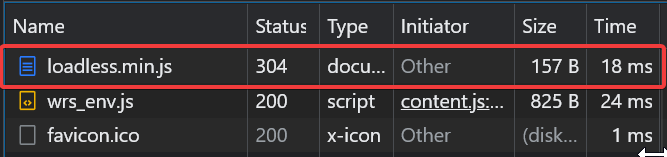
worrying about size? Don’t! The library file is only 157 B
There is also functionality to do custom animations on page change, and we’ve also made many animations like animate-left, animate-right, fadein, fadeout and many more to come!
OK, but how do I use it?
Using it is veryyy easy:
use the CDN link
Just paste this script in the header of your HTML file
<script src="https://cdn.jsdelivr.net/gh/loadless/loadless@main/dist/loadless.min.js" defer></script>Creating pages
You can create a page by giving the page a data-page="page_id" and the trigger to show that page will be data-loadless-btn="page_id". This will make all the other sister divs (which are pages and under the parent) disappear.
(note: to use the animations, you have to also import an optional CSS file, from here: https://cdn.jsdelivr.net/gh/loadless/loadless@main/dist/animations.css)
Here’s an example
    <a data-loadless-btn="1" href="#hello">Click here to say Hello</a> <br>
    <a data-loadless-btn="two" href="#world">Click here to say world</a>

    <div data-loadless-parent>
        <div id="hello" data-page="1" data-animate="left">
            Hello
        </div>
        <div id="world" data-page="two" data-animate="fadein">
            World
        </div>
        <div>
            another div
        </div>
    </div>
Here, I have given it an href so that the page is “linkable”.
the possibilities for this are endless - this makes so many things easier for beginner web developers. Here’s an example where ADI used loadless in his portfolio: https://cdn.discordapp.com/attachments/956570293164462091/957197579903442954/Untitled_15.mp4
For any help, join our discord server: https://discord.gg/DshUYxbWWX
We’re working on more animations, documentation, website and much more. Support us by ⭐-ing the project on GitHub!!
https://github.com/loadless/loadless
Any feedback for the same would be greatly appreciated!
💖 This blog if you liked it, Save this blog if you want to use it later .Follow me on My twitter, and if you REALLY liked this blog, and please follow me here on dev.to (350 followers possible? ) !